Blue Yeti USB Microphone
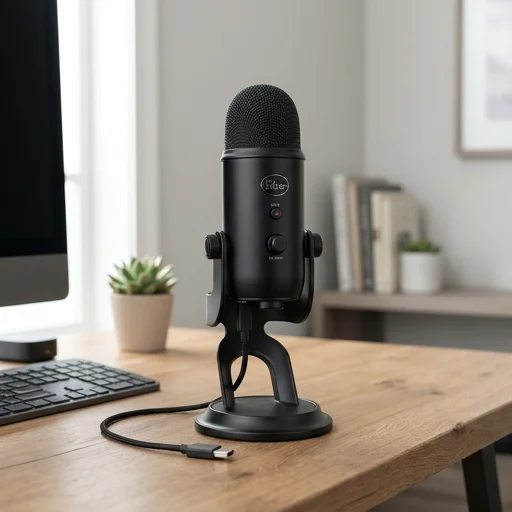
Key features
- Tri-capsule array with four pickup patterns
- Cardioid, omnidirectional, bidirectional, and stereo modes
- Plug-and-play USB connectivity
- Built-in headphone jack for zero-latency monitoring
- Onboard gain control and mute button
Specifications
Pros
- ✓ Excellent audio clarity for voice and streaming
- ✓ Easy setup with no drivers needed on most systems
- ✓ Versatile pattern options for different recording scenarios
- ✓ Sturdy build with adjustable desktop stand
- ✓ Real-time monitoring without lag
Cons
- ✕ Quite large and heavy for small desk setups
- ✕ Picks up background noise on omnidirectional mode
- ✕ No pop filter included in the box
- ✕ USB-only, lacks XLR option for pro audio interfaces
In-Depth Review
The Blue Yeti USB Microphone stands as one of the most trusted names in home office audio, delivering studio-quality sound for professionals who work from home, host podcasts, or conduct virtual meetings. This microphone connects directly to your computer via USB, eliminating the need for complicated audio interfaces or external mixers. Its plug-and-play design means you can start recording crisp, clear audio within minutes of unboxing, making it ideal for busy professionals who need reliable equipment without a steep learning curve. The tri-capsule array captures sound with remarkable clarity, picking up nuances in voice tone that lesser microphones often miss, which is especially valuable during video conferences where clear communication is essential. Versatility defines the Blue Yeti experience, as it offers four distinct pickup patterns—cardioid, omnidirectional, bidirectional, and stereo—allowing users to customize their recording setup based on the task at hand. For solo video calls or voiceover work, the cardioid pattern focuses on your voice while minimizing background noise from your home office environment. When conducting interviews or recording with a colleague in the same room, the bidirectional setting captures both voices naturally. This adaptability makes the Blue Yeti a genuinely multi-purpose tool rather than a single-function accessory, justifying its place as a centerpiece in any serious home office audio setup. Built with a sturdy metal housing and an adjustable desktop stand, the Blue Yeti feels substantial and durable, reflecting its reputation as professional-grade equipment rather than a flimsy peripheral. The onboard controls, including a mute button, gain dial, and headphone volume knob, give users real-time control without needing to dig through software settings mid-recording. A built-in headphone jack allows for zero-latency monitoring, so you can hear exactly how you sound as you speak, catching any issues before they become a problem in an important meeting or recording session. For anyone building out a home office focused on clear communication, whether for remote work, content creation, or streaming, the Blue Yeti USB Microphone remains a dependable, high-performing choice that consistently delivers professional results.
Customer reviews
Switched to this from my laptop mic and the difference is night and day. My video calls sound so much clearer now.
Audio quality is fantastic for podcasting from home, but it takes up a lot of desk space with the stand.
The multiple pickup patterns are super useful for interviews and solo recordings alike. Highly recommend for any home office.
Been using it daily for work meetings and streaming. Occasionally picks up my keyboard clicks but overall very good.