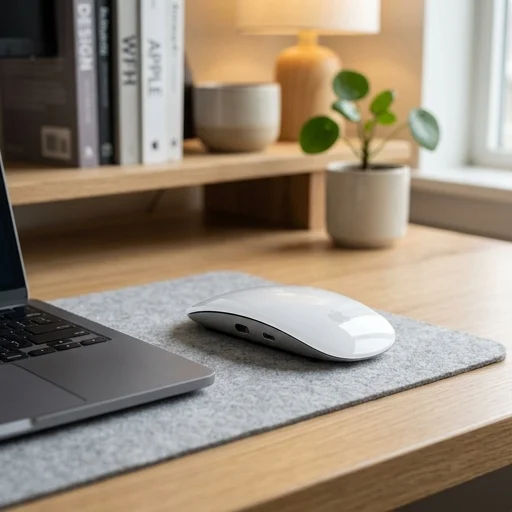
Apple Magic Mouse
Key features
- Multi-Touch surface for gesture control
- Rechargeable built-in battery with Lightning port
- Bluetooth wireless connectivity
- Optical sensor tracking
- Seamless pairing with Mac via Bluetooth
- Swipe gestures for scrolling and navigation
Specifications
Pros
- ✓ Sleek, lightweight design fits home office aesthetics
- ✓ Smooth multi-touch gestures replace extra buttons
- ✓ Long battery life on a single charge
- ✓ Easy pairing with macOS devices
- ✓ No moving scroll wheel to collect dust
Cons
- ✕ Charging port placement makes it unusable while charging
- ✕ Low profile design can cause hand cramping over long use
- ✕ Not ideal for gaming due to input lag
- ✕ Limited customization without third-party software
- ✕ Can feel slippery on modern glass desks
In-Depth Review
The Apple Magic Mouse brings a sleek, minimalist design to any home office setup, blending seamlessly with the clean aesthetic that Apple products are known for. Its low-profile silhouette and smooth, seamless top shell house a multi-touch surface that eliminates the need for traditional buttons or a scroll wheel, allowing for fluid, intuitive gestures. Whether you are navigating spreadsheets, scrolling through lengthy documents, or swiping between virtual desktops, the mouse responds with a level of precision and responsiveness that feels distinctly modern. The rechargeable battery, paired with a Lightning to USB-C cable, means one less set of disposable batteries cluttering your desk drawer, reinforcing the device's commitment to a tidy, efficient workspace. Designed specifically to complement Mac computers, the Apple Magic Mouse pairs effortlessly via Bluetooth, connecting almost instantly to your MacBook, iMac, or Mac mini without the hassle of dongles or additional software installations. This seamless integration is particularly valuable for home office users who rely on quick setup and teardown, whether working from a dedicated desk or transitioning between a kitchen table and a home study. The optical sensor beneath the mouse tracks movement with high accuracy across a variety of desk surfaces, from wood to laminate, ensuring that cursor movement remains smooth and predictable during long stretches of work. Its ergonomic curve, while subtle, is engineered to reduce wrist strain during extended use, a thoughtful touch for professionals who spend hours navigating spreadsheets, design software, or web browsers each day. Beyond its functional benefits, the Apple Magic Mouse contributes to the overall polish of a home office environment, an increasingly important consideration as personal workspaces double as backdrops for video calls and virtual meetings. Its white or space gray finish, depending on the model, coordinates effortlessly with Apple keyboards, monitors, and other peripherals, creating a cohesive, professional look. The absence of visible buttons and the quiet click mechanism also make it a discreet choice for shared home spaces, where noise and clutter can be a concern. For anyone building or refining a home office centered around efficiency, minimalism, and seamless Apple ecosystem integration, the Magic Mouse remains a practical and stylish addition to the desk setup.
Customer reviews
Pairs instantly with my MacBook and the gestures make scrolling through documents effortless. Looks great next to my keyboard too.
I love the design and how light it is, but having to flip it over to charge via the Lightning port at the bottom is inconvenient during a busy workday.
Not for gaming, but for spreadsheets, emails, and browsing it's smooth and responsive. Battery lasts me almost a month.
The gesture scrolling took some getting used to, but now I can't imagine going back to a regular mouse for my daily workflow.